![recite-logo-large_trans.png]](https://knowledge.reciteme.com/hs-fs/hubfs/recite-logo-large_trans.png?height=40&name=recite-logo-large_trans.png)
If you would like to see a statistic or request a feature then please add it here Feedback Survey
As part of our continued commitment to improving user engagement and delivering more meaningful insights, we have updated the way we capture and present usage data for your accessibility toolbar.
This update introduces more transparent and user friendly reporting, giving you direct access to your data and a view of how the toolbar is being used on your your website.
What’s New?
We are in the process of migrating clients to get access to the New Reporting Dashboard. Over the next week you will receive an invite from Recite Me (see image below)
Press Join Now and following the prompts to create your account.
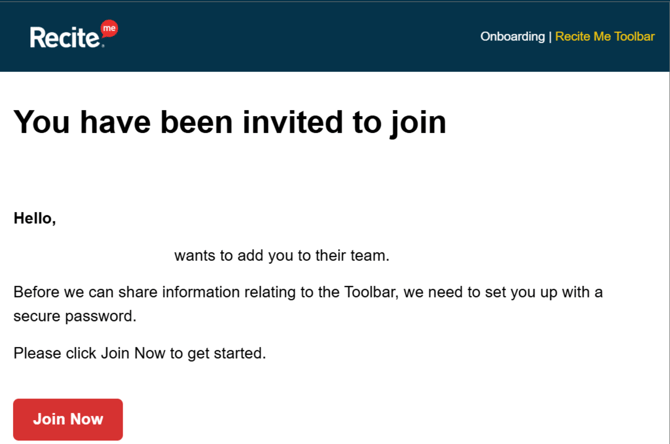
Once logged in, you will be able to self serve and explore your usage data as and when you need it.
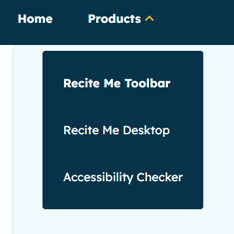
Please note: If you are also Checker client then all you need to do is simply go up to Products (top left) and select Recite Me Toolbar.
Refining Our Approach:
From Event-Based to Click-Based Reporting
Previously, our reporting was based on event tracking, which captures a broad range of interactions across the user journey.
This included both direct actions and background or system driven triggers, such as page loads or interface elements appearing.
While this provided a comprehensive view of activity, we recognised an opportunity to further refine how we represent intentional user engagement.
Following a successful trial with over 260 clients, we have now transitioned to a click-based reporting model using Click House technology.
This enhanced approach focuses specifically on deliberate user actions, such as button clicks, enabling you to better understand how users are actively engaging with the toolbar and its features.
What This Means for Your Data
With click-based tracking:
- You may notice some differences in overall figures compared to previous reports
- These differences reflect a more focused view of direct user interactions
- The data now provides clearer insight into how users are actively engaging with your toolbar
What you can see in your Dashboard
- Launches - This shows every time a user has launched the toolbar
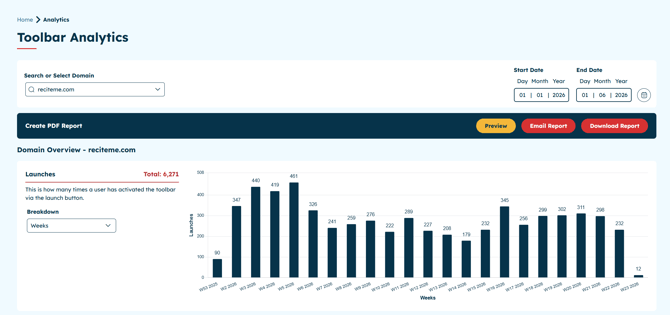
- Page Views & Breakdown – Pages viewed where the toolbar was actively in use
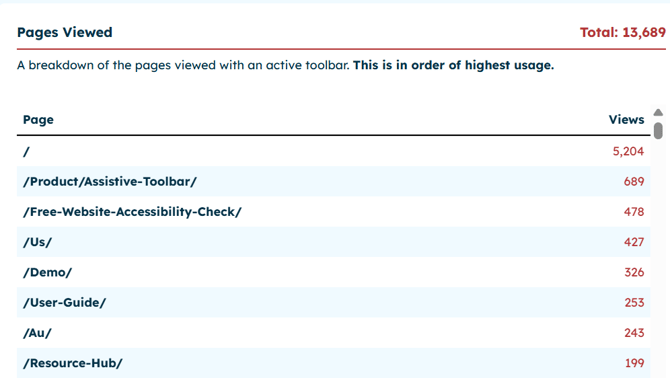
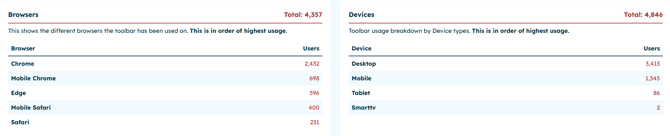
- Browsers – Which browsers your users are accessing the toolbar from
- Devices – Breakdown of device types (desktop, mobile, tablet)
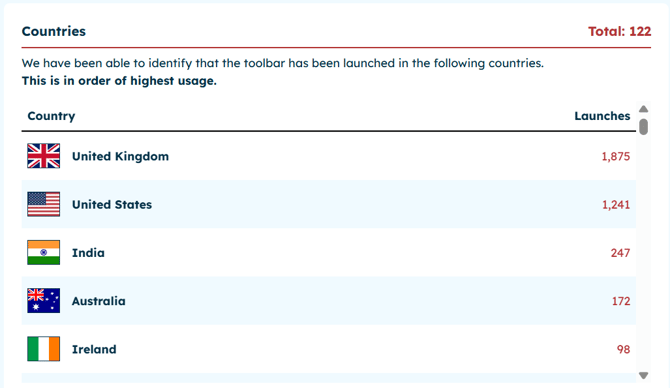
- Countries – Geographic distribution of toolbar usage
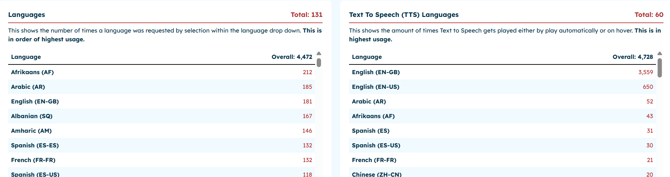
- Full Feature Breakdown – Number of times each feature has been used
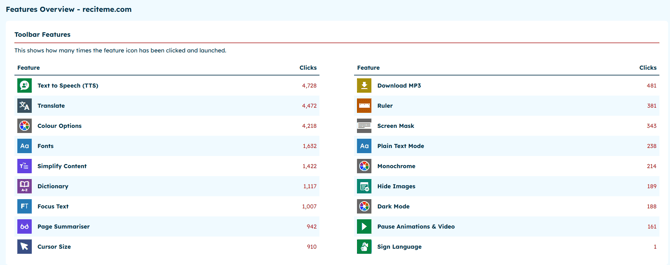
Feature breakdowns:
| Styling | Reading Aids | Translations | Text to Speech |
|---|---|---|---|
| Text Options | Focus Text | Languages | Text to Speech |
| Increase Font | Focus Audio | British Sign Language | Download Audio |
| Decrease Font | Page Structure | ||
| Colour | Cursor | ||
| Monochrome | Ruler | ||
| Dark Mode | Screen Mask | ||
| Dictionary | |||
| Simplify Content | |||
| Page Summariser |
- Language & Text-to-Speech Support – Languages your content has been translated into
We Value your Feedback
As this is new way of reporting, we would value your feedback to ensure this is meeting your needs, as well as capture any future requirements you may have.
This short survey aims to gather your thoughts on usability, functionality, and overall experience.
Your responses will directly influence future improvements and help us deliver a better, more effective reporting solution.
We appreciate your honest feedback and thank you for your continued support.
Click here to complete our: Feedback Survey
Would you like to see something that we don't already show, then please complete our Feature request form - We welcome all client feature requests
If you would like to discuss your reporting in more detail please contact either your CSM or customer.support@reciteme.com who will be happy to help.