![recite-logo-large_trans.png]](https://knowledge.reciteme.com/hs-fs/hubfs/recite-logo-large_trans.png?height=40&name=recite-logo-large_trans.png)
2026 AT A GLANCE SO FAR:
🌟10 + NEW FEATURES 🌟8 + FEATURE ENHANCEMENTS
OVER 6.5 Million Toolbar Launches and counting..
⭐Want to see a new feature? ⭐
Coming soon - Currently in Development
Toolbar High-Contrast Icon Colour
Giving greater personalisation by introducing options.
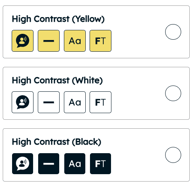
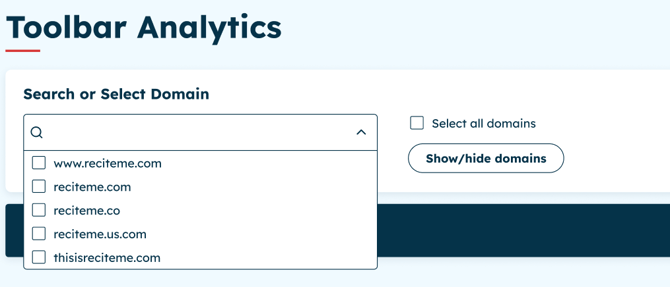
Toolbar User Statistics Dashboard Enhancements.
- Ability to Hide Domains from the Domain drop down
- Combine your domains to so you can see a total figure of how many people you are supporting with the toolbar.
New customisable Focus Mask
You choose the size, shape and opacity to find what works best for you.
Released to Production in August 2026
Introducing our New Voice Control
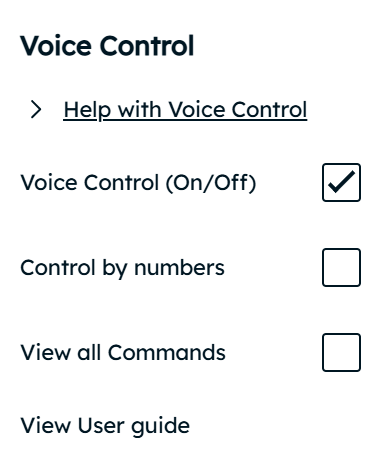
Our new Voice Control gives people another way to interact with the Toolbar, allowing users to navigate and activate features using simple spoken commands rather than relying on a mouse or keyboard.
Voice Control applies to the toolbar and its features only and is not designed to replace the assistive technologies people may already use, but to work alongside them and give people more options to interact in the way that works best for them.
Users remain fully in control, choosing whether to switch Voice Control on and using either feature names or numbered commands to navigate the Toolbar.
How it works:
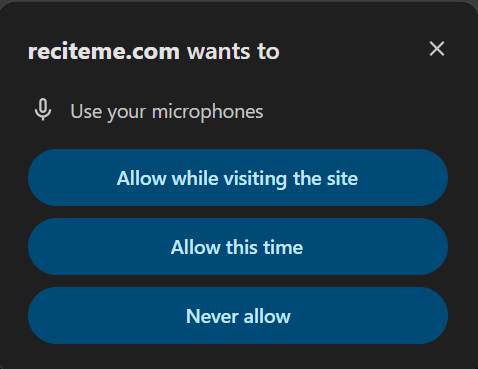
On activation a user will be asked to give permission to use the Microphone.
Key note: All voice command processing happens entirely on the users machine, no data is ever shared with Recite Me.
*If user declines access the feature will not work.
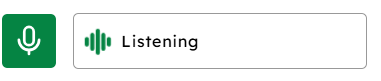
You can then choose:
Control by Numbers - Which will add a number to each toolbar element. Simply say Click, Select or Press plus number.

Control by Feature Name - Say the name of the feature to activate the feature. Once active saying the name again will turn the feature off.
Key Examples:
To Increase the Size of the text say "Increase Text Size"
To turn on Ruler say "Ruler" this will activate the Ruler, to change the colour say "Ruler Red"
To change the language of the page, say Language followed by the language you want e.g "Language French"
For a full list of commands, press View all Commands
Help us make Voice Control even better
We understand that everyone communicates differently, and we want to continue developing Voice Control to make it as simple, intuitive and accessible as possible for everyone.
Have an idea for an improvement, or feedback on how Voice Control works for you? We’d love to hear from you.
Please share your feedback using the form below.
⭐Voice Control Suggestions ⭐
Released to Production in July 2026
Introducing our New Smart Suggest Feature
Accessibility that adapts to your content
Some accessibility tools offer predefined profiles and assumptions.
They apply a one size fits-all approach, which groups users into categories, activating a fixed set of accessibility features based on those profiles.
While convenient, we do not believe this is the right approach, because we are all unique and view web content differently.
Smart Suggest takes a different approach..
Instead of relying on generic accessibility profiles, Smart Suggest intelligently scans each page and analyses the actual content being presented.
It understands what is on the page and provides context aware recommendations that are relevant to that specific content.
This means users receive accessibility suggestions based on what they are viewing and not on assumptions about their needs or a predefined profile.
We strongly believe this is a more personalised, accurate, and effective accessibility feature that allows a user to see recommendations, whilst still choosing what works best for them.
So how does it work?
-
On page launch smart suggest scans the page and categorises it based on the content it finds. It does not use AI to understand the page. Instead, it uses a rules-based scoring system. It scans different parts of a webpage and assigns points (or "weights") based on what it finds. The category with the highest score determines what type of page it is.
-
Once identified features which may help support based on the content will then gently pulse.
-
A user is then able to use and view features as they would normally until they find what works best for them
-
As with all of our features, a user has the ability to simply turn off the feature should the choose.
Our toolbar provides a range of accessibility features designed to support diverse user needs.
The features shown on each page are selected based on the page category and content, making the most relevant tools available where they are likely to be most helpful.
| Page Category | Recommended Features |
| Reading | Focus Text, Page Options, Screen Mask, Page Summariser (If active) |
| Reference | Screen Mask , Ruler, Increase Font Size |
| Shopping | Font Size, Page Options, Colour Themes |
| Form Content | Font Size, Screen Mask, Ruler |
| Media | Page Options, Colour Themes , Cursor |
| Social | Increase font size, Colour Themes, Screen Mask |
| Educational | Focus Audio, Page Options, Ruler |
| Data | Ruler, Screen Mask, Font Size |
We believe that accessibility should respond to the content and not rely on assumptions.
Smart Suggest makes every page smarter, more relevant, and more accessible.
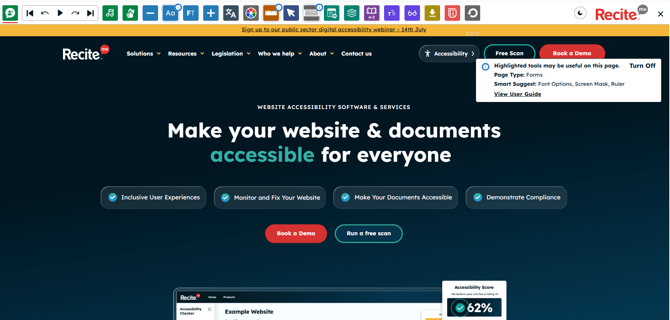
Feature Enhancement - Screen Mask Edge Colour
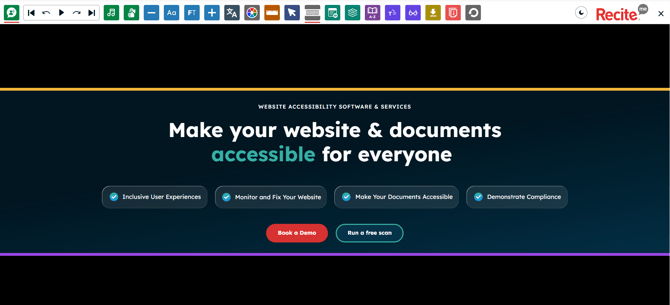
As we continue to build on our features this update is giving a user the ability to add an Edge Colour to our Screen Mask.
Research suggests that adding an optional Edge Colour help provide visual cues that may help users identify and maintain focus within the active reading area.
This is aimed to supports users with attention and tracking difficulties by improving visual guidance.
UI Update Continue
We continue to focus on our user interface and are rounding off the corners of our dropdowns and round our buttons. This simple yet effective update ensures we continue to evolve and update the Users experience. Watch this space as there is more to come.
Released to Production in June 2026
Ruler Feature Update - Enhanced Reading Support
Our Ruler plays an important role in supporting reading focus and visual tracking, but prior to this update it offered limited personalisation options.
This release introduces greater control over how the Ruler appears and behaves, helping users focus more effectively while reading and interacting with content.
What’s new?
- Ability to choose ruler size
- Option to turn gridlines on or off
By introducing additional customisation options such as size and guideline styles, the Ruler now better supports a wider range of preferences and accessibility needs.
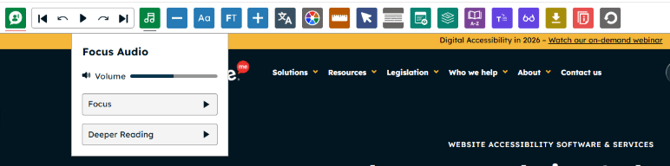
Introducing Our New Focus Audio Feature
Our new Focus Audio feature was inspired by a collaboration with the Orpheus Centre, a specialist independent college for young disabled adults.
As part of the partnership, we delivered a series of workshops designed to introduce students to the product development process and the diverse roles involved in bringing a digital product to life.
Throughout the programme, students were challenged to develop ideas that they could explore collaboratively with the Recite Me team. Discussions quickly centred around audio, emotion, and concentration, with many students sharing how sound helps them regulate focus, reduce cognitive load, and engage more effectively with information.
These insights led to the creation of Focus Audio — a feature designed to support concentration and encourage deeper engagement with digital content through gentle background audio.
The audio itself was selected through research conducted by the students within their college community. After gathering feedback and testing different options, students voted on the audio they felt worked best.
Designed to sit just above silence without becoming distracting, Focus Audio helps create a more comfortable reading experience, particularly for neurodivergent users and those experiencing cognitive fatigue when navigating longer or more complex online content.
This feature is a testament to the value of co-creation and inclusive design, demonstrating how meaningful collaboration can lead to innovations that benefit a wider audience.
Our end users are our priority, so if you have any projects or interested in us working with you on user research then please get in touch as we would love to hear from you.
Introducing Vertical Screen Mask Support
We are pleased to introduce a simple yet effective enhancement to our existing Screen Mask feature.
Our current Screen Mask, provides a horizontal reading guide that follows a traditional reading pattern (left to right, top to bottom).
This helps users maintain their place on the page, reduce visual distractions, and improve reading focus.
However, not all digital content is presented in a single column format.
Many websites and applications use multi-column layouts, tables, dashboards, comparison grids, and data-heavy interfaces that can be more challenging to navigate.
To better support these experiences, we have added a new Vertical Screen Mask option.
Who might benefit?
The Vertical Screen Mask can be particularly helpful for users who:
- Have dyslexia and benefit from additional visual guidance when tracking information.
- Experience attention related difficulties and want to minimise distractions from surrounding content.
- Find it challenging to maintain focus when reading across complex page layouts.
- Work regularly with tables, spreadsheets, comparison charts, or multi-column content.
- Prefer to isolate a specific section of content while reviewing information on screen.
How it helps
By creating a focused vertical reading area, users can more easily track content within a single column, reducing visual clutter and helping them concentrate on the information most relevant to them.
This enhancement gives users greater flexibility in how they interact with digital content, allowing them to choose the screen masking approach that best supports their individual reading and navigation preferences.
Released to Production in May 2026
May saw two production releases. As we worked on some exiting new features we will continued to strengthen the Toolbar by resolving some minor accessibility bug fixes.
We also enhanced our Language launch options, giving clients greater control on how as well as enhanced our support to clients with Language Drop downs.
Released to Production in April 2026
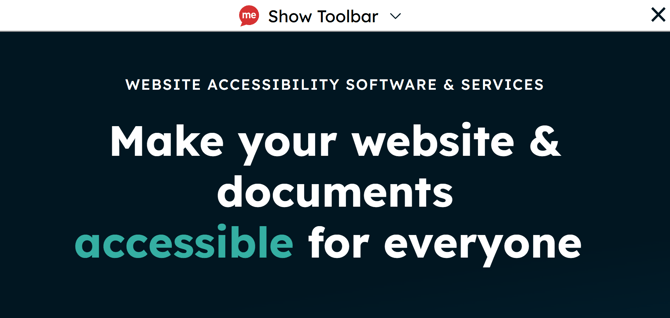
HIDE TOOLBAR ON ZOOM - You can now hide the toolbar while zoomed in, giving you more screen space and a clearer view of content.
Who this supports
-
People with low vision who zoom in and lose usable space
-
Users with cognitive disabilities who benefit from less clutter and fewer distractions
-
Users on small screens or magnified displays (including mobile users or screen magnifier users)
-
People with motor impairments who may find large fixed toolbars harder to navigate around
Below image shows the Hide appear on Zoom:

On zoom the Toolbar displays with Show Toolbar:
YOUTUBE INTEGRATION FOR BRITISH SIGN LANGUAGE*
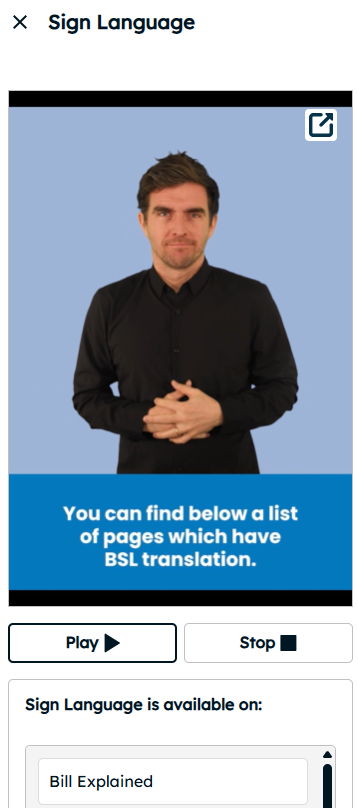
Alongside the support we provide in creating sign language content, we recognise that many organisations already have British Sign Language (BSL) videos hosted outside their website.
Our BSL feature now supports YouTube integration, making it easy to connect your existing videos and direct users to the support you already offer.
How it works
If you already have BSL videos on YouTube:
- Simply share the direct links with us
- Activate the BSL feature on your site
Once enabled, users can easily discover and access the sign language support available to them.
*Subject to implementation charge
Accessibility Enhancements:
Keyboard Navigation - We have improved keyboard functionality, ensuring all key features are fully accessible without a mouse.
Client configurable Skip Link - The Toolbar has a Skip to Content link, this can now be turned off should client choose.
Released to Production in March 2026
-
Dark Mode Feature Update – Dark Mode has been moved from the colour theme dropdown directly onto the toolbar, giving users greater control over how they view the toolbar.
-
This feature is also now client-configurable, allowing you to set the toolbar to launch in Dark Mode if preferred.

- New Feature - AI Transcripts for Video - Supporting Users to gain a greater comprehension on videos , transcripts for Video will detect supported video formats (mp4) on the webpage and produce AI generated transcripts with the side modal for that video.
- As this feature is reliant on video format, this will be offered as an Opt In feature and not turned on for all, so please speak with your Recite Me contact for full details.
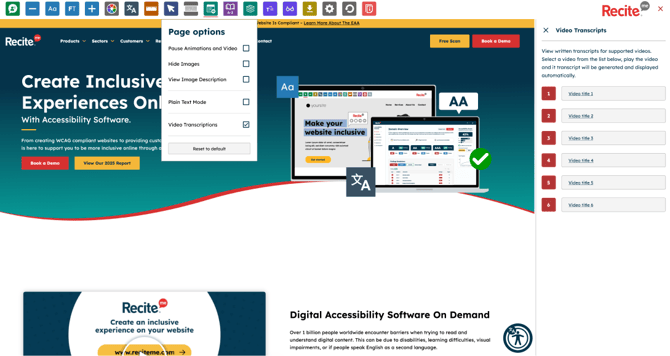
Accessibility enhancement - Focus Indicator Review
Focus indicators is the visual highlight that shows which element on our toolbar is currently selected (in focus) when navigating. We have reviewed these and made updates to ensure consistency across the toolbar.

*Example above displays focus on our Colour Theme feature
Released to Production in February 2026
As part of our ongoing commitment to continuous improvement, this update enhances the Toolbar Tutorial by relocating it from the central pop up to the side modal.
This change enables users to keep the tutorial open while interacting with the Toolbar, making it easier to follow instructions without disrupting their experience.
Additionally, we are simplifying the language to User Guide to improve clarity, increase feature engagement, and ultimately enhance the support available to our users.
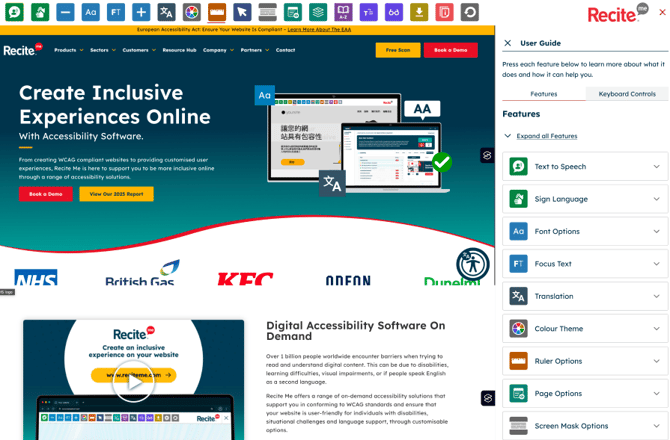
Opened via the Information drop down users can see key information around each feature as well as a little description around who its aims to support.
 a
a
Released to Production in January 2026
-
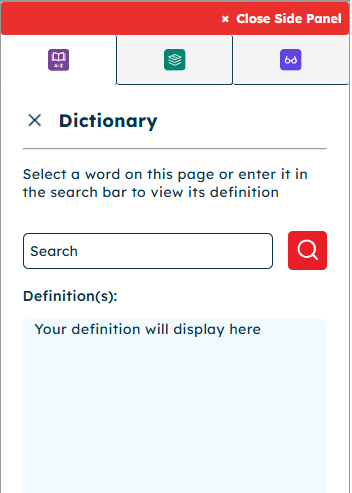
Features moved to a side modal: To maintain a consistent user interface across the Toolbar the Dictionary has been moved into the side modal.
-
Side Modal Multi-feature support: Users can now enable and use multiple features simultaneously, giving greater flexibility and control over the features they choose.
-
Improved usability: The side modal is designed to be intuitive and easy to navigate, helping users find and adjust the features they need quickly.
-
Sign Language (Additional Feature) – Enlarged Video Capability:
Based on user feedback, we have enhanced the Sign Language feature to include an option to enlarge the video. Clicking the icon now displays the video in the centre of the page, making it easier for users to view the content clearly.

-
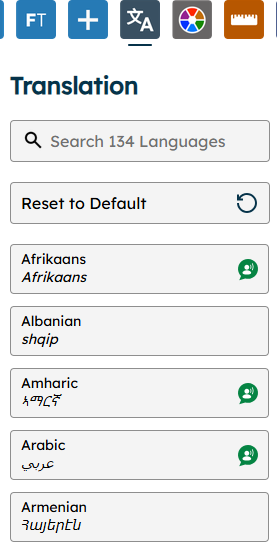
Feature Enhancement - Languages- With support for over 130 languages and usage by more than half a million users in 2025 alone, our Language feature remains a key part of the Toolbar. Following accessibility recommendations we have reviewed the feature and making the following updates:
User Interface
- Limiting the amount of Languages displayed on launch to reduce overwhelm on launch
- Replace the existing speaker Icon with our Text to Speech Icon to Languages with speech support with the aim to improve understanding of its function
- Reset to Default will change Language on selection, however adding the Reset Icon to improve understanding.
Search Functionality
-
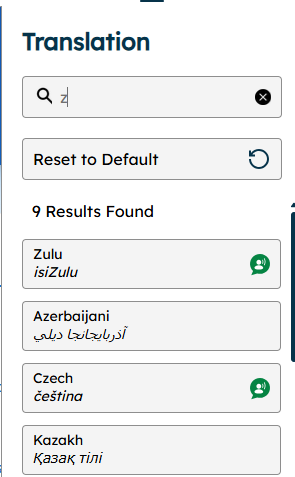
Enhancements to the search functionality, as currently entering a letter such as Z will display results containing that letter, this update will still perform that action, however Languages beginning with that letter will display first.
Error Messaging
-
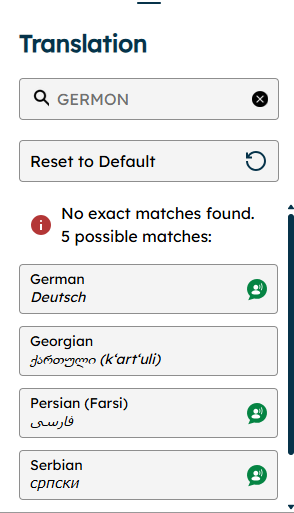
Currently if a user enters a language incorrectly, they are presented with a message stating no results found, this update now presents users with a message No exact matches found, but also provide a list of possible matches.
-
Client Customisable Top Used Languages - Currently our Languages display alphabetically in our language drop down, this update will allow a client to specify their top 5 languages to appear first.
For more information on this on this or if you have a suggestion of what you would love to see on our Toolbar then please contact customersupport@reciteme.com