---
title: (BETA) Contrast Scanner
description: How to scan local and live content in your Chrome browser.
---
[Skip to content](https://knowledge.reciteme.com/knowledge/contrast-scanner#main-content)
English
Show submenu for translations
![recite-logo-large\_trans.png\]](https://knowledge.reciteme.com/hs-fs/hubfs/recite-logo-large_trans.png?height=40&name=recite-logo-large_trans.png)
Open main navigation
Close main navigation
- English
Show submenu for translations
- Go to reciteme.com
Go to reciteme.com
Hello. How can we help you?
- There are no suggestions because the search field is empty.
1. [Help Centre](https://knowledge.reciteme.com/knowledge?hsLang=en)
2. [Checker Knowledge Base](https://knowledge.reciteme.com/knowledge/checker-knowledge-base?hsLang=en)
3. [Chrome Extension](https://knowledge.reciteme.com/knowledge/checker-knowledge-base?hsLang=en#chrome-extension)
June 1, 2026
# (BETA) Contrast Scanner
## The WCAG Contrast Scanner helps you quickly identify and fix colour contrast issues on any webpage
### Accessing the WCAG Contrast Scanner
- Your **Customer Success Manager** will provide you with a link to install the WCAG Contrast Scanner.
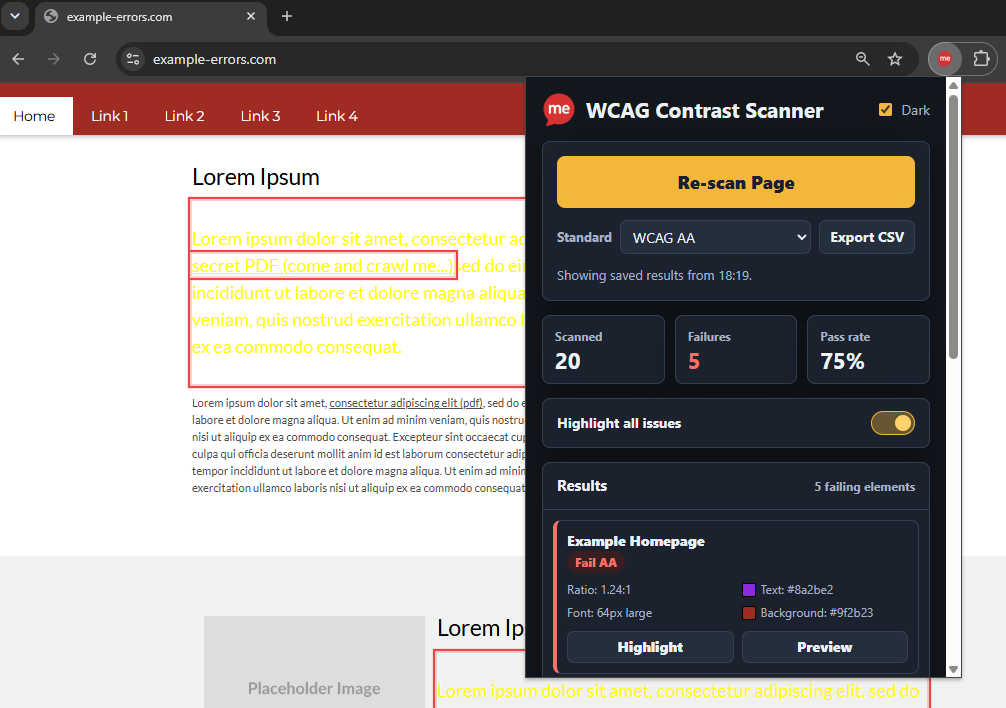
- Once installed, click the **Extensions** icon in the top-right corner of your browser and select **WCAG Contrast Scanner**. This will open the scanner panel.
### Using the WCAG Contrast Scanner
The WCAG Contrast Scanner helps you quickly identify and fix colour contrast issues on any webpage, whether it's a live website or a local development environment.
1. Select the **WCAG Standard** you wish to test against (e.g. WCAG AA or AAA).
2. Click **"Scan Page"** to analyse all visible text content on the current page.
3. Any contrast failures will be listed in the **Results** panel, along with the overall pass rate and number of issues found.
4. Click **"Highlight"** on any issue to locate the failing element directly on the page.
5. Review the detailed information provided, including:
- The failing text
- Foreground (text) colour
- Background colour
- Contrast ratio
- Font size
- Font weight
- WCAG level failed
6. Click **"Preview"** on any issue to use the built-in **Colour Wheel** to experiment with alternative colours. Suggested colours that meet the selected WCAG standard are automatically highlighted in **green**, helping you find accessible alternatives quickly.
7. Enable **"Highlight all issues"** to view every failing element on the page at once.
8. Click **"Export CSV"** to download a report containing all identified contrast issues for auditing, sharing, or remediation tracking.
#### Key Features
- Scans live websites and local development pages.
- Tests text and background colour combinations against WCAG contrast requirements.
- Highlights failing elements directly within the browser.
- Displays colour values, contrast ratios, font size, and font weight.
- Provides accessible colour suggestions with pass/fail indicators.
- Exports detailed results to CSV for reporting and compliance reviews.
The WCAG Contrast Scanner makes it easy to identify accessibility issues, understand why they fail, and find compliant colour combinations without leaving your browser.
- [Toolbar Knowledge Base](https://knowledge.reciteme.com/knowledge/toolbar-knowledge-base?hsLang=en#main-content)
- [2026 Product Updates](https://knowledge.reciteme.com/knowledge/toolbar-knowledge-base?hsLang=en#2026-product-updates)
- [2025 Product Updates](https://knowledge.reciteme.com/knowledge/toolbar-knowledge-base?hsLang=en#2025-product-updates)
- [Toolbar Overview](https://knowledge.reciteme.com/knowledge/toolbar-knowledge-base?hsLang=en#toolbar-overview)
- [Documentation](https://knowledge.reciteme.com/knowledge/toolbar-knowledge-base?hsLang=en#documentation)
- [Implementation & Button Guides](https://knowledge.reciteme.com/knowledge/implementation-button-guides?hsLang=en#main-content)
- [Useful Supporting Documentation](https://knowledge.reciteme.com/knowledge/implementation-button-guides?hsLang=en#useful-supporting-documentation)
- [Checker Knowledge Base](https://knowledge.reciteme.com/knowledge/checker-knowledge-base?hsLang=en#main-content)
- [Accessing Your Account](https://knowledge.reciteme.com/knowledge/checker-knowledge-base?hsLang=en#accessing-your-account)
- [My Domains](https://knowledge.reciteme.com/knowledge/checker-knowledge-base?hsLang=en#my-domains)
- [Understanding Your Results](https://knowledge.reciteme.com/knowledge/checker-knowledge-base?hsLang=en#understanding-your-results)
- [Integration Settings](https://knowledge.reciteme.com/knowledge/checker-knowledge-base?hsLang=en#integration-settings)
- [Create a Report](https://knowledge.reciteme.com/knowledge/checker-knowledge-base?hsLang=en#create-a-report)
- [Chrome Extension](https://knowledge.reciteme.com/knowledge/checker-knowledge-base?hsLang=en#chrome-extension)
- [Crawler - Domain Digital Landscape Detection](https://knowledge.reciteme.com/knowledge/checker-knowledge-base?hsLang=en#crawler-domain-digital-landscape-detection)
- [Product Updates](https://knowledge.reciteme.com/knowledge/checker-knowledge-base?hsLang=en#product-updates)
- [Accessibility Statement Templates](https://knowledge.reciteme.com/knowledge/checker-knowledge-base?hsLang=en#accessibility-statement-templates)
- [Troubleshooting](https://knowledge.reciteme.com/knowledge/checker-knowledge-base?hsLang=en#troubleshooting)
- [PDF Remediator Knowledge Base](https://knowledge.reciteme.com/knowledge/pdf-remediator-knowledge-base?hsLang=en#main-content)
- [PDF Remediator Overview](https://knowledge.reciteme.com/knowledge/pdf-remediator-knowledge-base?hsLang=en#pdf-remediator-overview)
- [Troubleshooting](https://knowledge.reciteme.com/knowledge/pdf-remediator-knowledge-base?hsLang=en#troubleshooting)
- [Security, Continuity and Data Protection](https://knowledge.reciteme.com/knowledge/security-continuity-and-data-protection?hsLang=en#main-content)
- [Certification](https://knowledge.reciteme.com/knowledge/security-continuity-and-data-protection?hsLang=en#certification)
- [Assessments and Security Grades](https://knowledge.reciteme.com/knowledge/security-continuity-and-data-protection?hsLang=en#assessments-and-security-grades)
- [Information Security](https://knowledge.reciteme.com/knowledge/security-continuity-and-data-protection?hsLang=en#information-security)
- [Data Protection](https://knowledge.reciteme.com/knowledge/security-continuity-and-data-protection?hsLang=en#data-protection)
- [Terms Of Service](https://knowledge.reciteme.com/knowledge/terms-of-service?hsLang=en#main-content)
- [Terms](https://knowledge.reciteme.com/knowledge/terms-of-service?hsLang=en#terms)
- [Description of Services](https://knowledge.reciteme.com/knowledge/terms-of-service?hsLang=en#description-of-services)
- [Finance](https://knowledge.reciteme.com/knowledge/finance?hsLang=en)
- [Marketing Resources (UK)](https://knowledge.reciteme.com/knowledge/marketing-resources-uk?hsLang=en#main-content)
- [Getting Started](https://knowledge.reciteme.com/knowledge/marketing-resources-uk?hsLang=en#getting-started)
- [Website Content](https://knowledge.reciteme.com/knowledge/marketing-resources-uk?hsLang=en#website-content)
- [Brand](https://knowledge.reciteme.com/knowledge/marketing-resources-uk?hsLang=en#brand)
- [Internal Comms](https://knowledge.reciteme.com/knowledge/marketing-resources-uk?hsLang=en#internal-comms)
- [External Comms](https://knowledge.reciteme.com/knowledge/marketing-resources-uk?hsLang=en#external-comms)
- [Customer Examples](https://knowledge.reciteme.com/knowledge/marketing-resources-uk?hsLang=en#customer-examples)
- [Advance Your Accessibility Efforts](https://knowledge.reciteme.com/knowledge/marketing-resources-uk?hsLang=en#advance-your-accessibility-efforts)
- [Get Featured on the Recite Me Website](https://knowledge.reciteme.com/knowledge/marketing-resources-uk?hsLang=en#get-featured-on-the-recite-me-website)
- [Marketing Resources (USA)](https://knowledge.reciteme.com/knowledge/marketing-resources-usa?hsLang=en#main-content)
- [Getting Started](https://knowledge.reciteme.com/knowledge/marketing-resources-usa?hsLang=en#getting-started)
- [Website Content](https://knowledge.reciteme.com/knowledge/marketing-resources-usa?hsLang=en#website-content)
- [Recite Me Brand](https://knowledge.reciteme.com/knowledge/marketing-resources-usa?hsLang=en#recite-me-brand)
- [Internal Comms](https://knowledge.reciteme.com/knowledge/marketing-resources-usa?hsLang=en#internal-comms)
- [External Comms](https://knowledge.reciteme.com/knowledge/marketing-resources-usa?hsLang=en#external-comms)
- [Client Examples](https://knowledge.reciteme.com/knowledge/marketing-resources-usa?hsLang=en#client-examples)
- [Advance Your Accessibility Efforts](https://knowledge.reciteme.com/knowledge/marketing-resources-usa?hsLang=en#advance-your-accessibility-efforts)
- [Get Featured on the Recite Me Website](https://knowledge.reciteme.com/knowledge/marketing-resources-usa?hsLang=en#get-featured-on-the-recite-me-website)
- [Marketing Resources (ANZ)](https://knowledge.reciteme.com/knowledge/marketing-resources-anz?hsLang=en#main-content)
- [Website Content](https://knowledge.reciteme.com/knowledge/marketing-resources-anz?hsLang=en#website-content)
- [Brand](https://knowledge.reciteme.com/knowledge/marketing-resources-anz?hsLang=en#brand)
- [Internal Comms](https://knowledge.reciteme.com/knowledge/marketing-resources-anz?hsLang=en#internal-comms)
- [External Comms](https://knowledge.reciteme.com/knowledge/marketing-resources-anz?hsLang=en#external-comms)
- [Get Featured on the Recite Me Website](https://knowledge.reciteme.com/knowledge/marketing-resources-anz?hsLang=en#get-featured-on-the-recite-me-website)
- [EAA](https://knowledge.reciteme.com/knowledge/eaa?hsLang=en)
- [Global Accessibility Awareness Day 2026](https://knowledge.reciteme.com/knowledge/global-accessibility-awareness-day-2026?hsLang=en#main-content)
- [Global Accessibility Awareness Day 2026](https://knowledge.reciteme.com/knowledge/global-accessibility-awareness-day-2026?hsLang=en#global-accessibility-awareness-day-2026)
- [National Inclusion Week 2026](https://knowledge.reciteme.com/knowledge/national-inclusion-week-2026?hsLang=en)
[](http://reciteme.com)
Recite Me Help Centre
Copyright © 2026, Recite Me