---
title: "Checker Product Update: 26 May 2026"
description: Updates include the ability to receive chat notifications, updated scan results view, and ability to stop a scan
---
[Skip to content](https://knowledge.reciteme.com/knowledge/checker-product-update-26-may-2026#main-content)
English
Show submenu for translations
![recite-logo-large\_trans.png\]](https://knowledge.reciteme.com/hs-fs/hubfs/recite-logo-large_trans.png?height=40&name=recite-logo-large_trans.png)
Open main navigation
Close main navigation
- English
Show submenu for translations
- Go to reciteme.com
Go to reciteme.com
Hello. How can we help you?
- There are no suggestions because the search field is empty.
1. [Help Centre](https://knowledge.reciteme.com/knowledge?hsLang=en)
2. [Checker Knowledge Base](https://knowledge.reciteme.com/knowledge/checker-knowledge-base?hsLang=en)
3. [Product Updates](https://knowledge.reciteme.com/knowledge/checker-knowledge-base?hsLang=en#product-updates)
May 26, 2026
# Checker Product Update: 26 May 2026
## This release includes an updated Scan Results interface, a new Notification Centre, and the ability to cancel an in-progress scan.
### **Scan Results - Updated Interface Display**
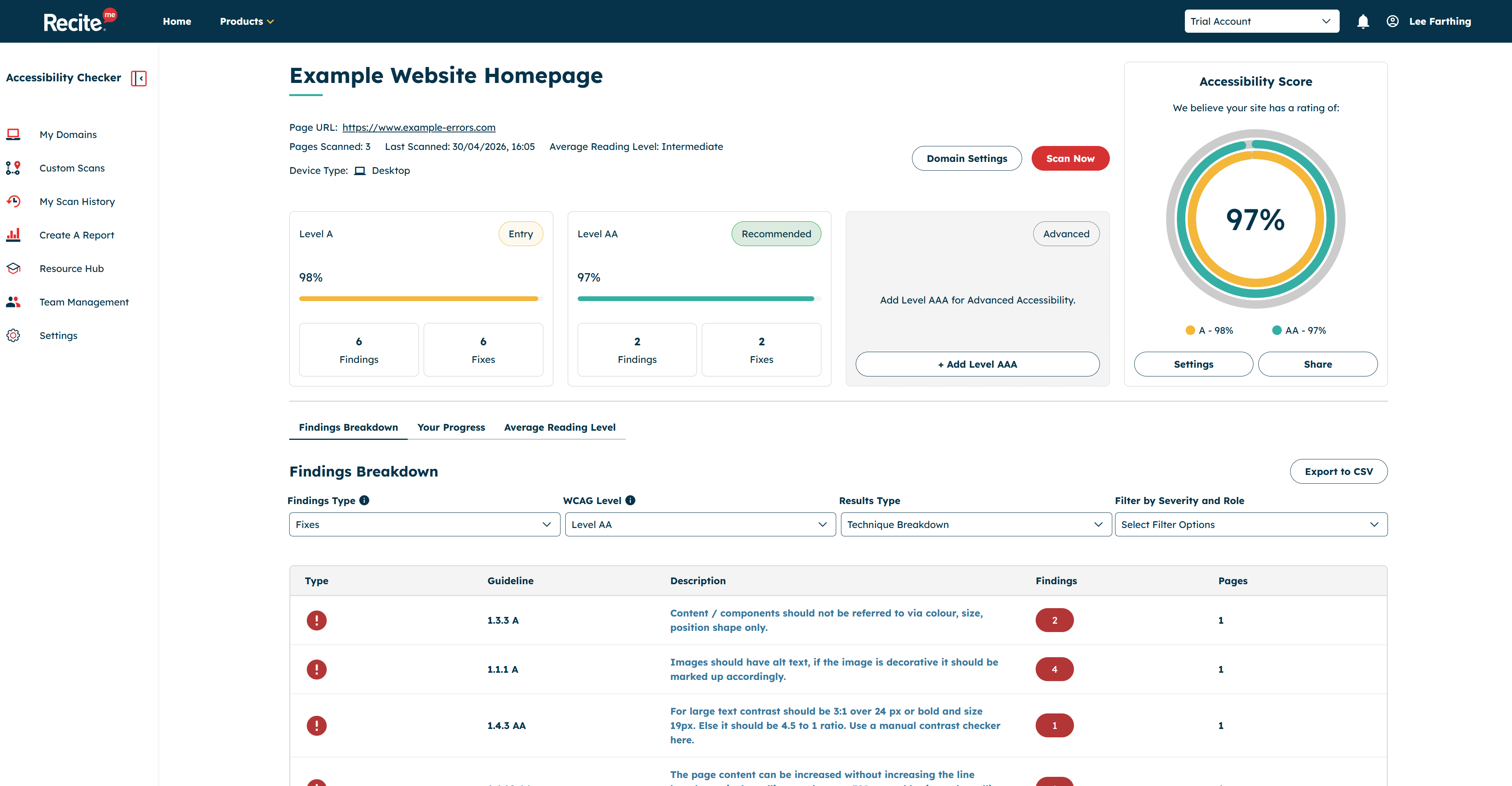
**New Layout**
**Previous Layout**
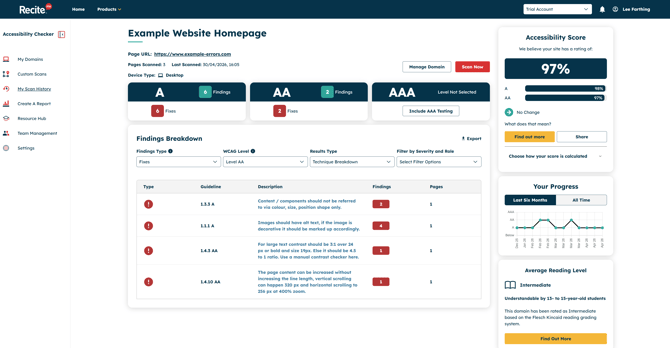
- The Scan Results page has been refreshed to improve usability and make key information easier to view. **Your Progress** and **Reading Age** have been moved from the side panel into their own dedicated sections, making them more prominent and easier to access.
- The **Your Progress** section also now includes a quick link to a simplified text view of the scan progress, providing an accessible and easy-to-read summary of your results.
### **Notifications Panel - Tag users in discussions**
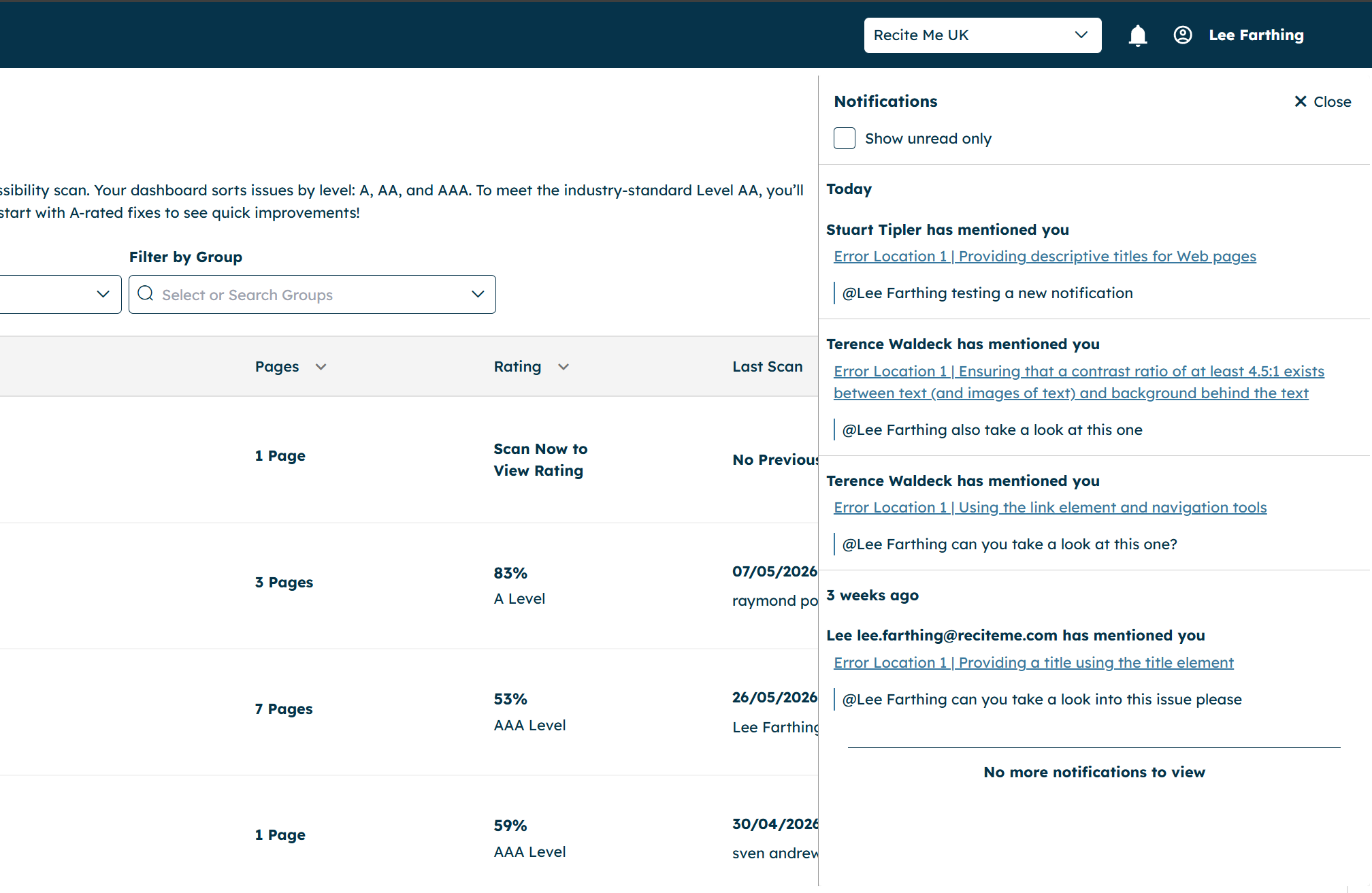
- A new notification bell is now available in the top right navigation. Initially, notifications will be generated when you are tagged by another user within a chat discussion, helping you stay up to date with relevant conversations.
- Notifications are retained for up to 30 days, and can be easily filtered between **Read** and **Unread** to help you manage and track activity.
- A red notification indicator is displayed next to the notification bell whenever there are new unread notifications, making it easy to see when action or attention is required.
### Additional Items Released
- **Ability to Stop a Scan**
- When a scan is in progress, you can select the arrow next to the scanning domain within the **My Domains** page to reveal additional options.
- If you need to stop the scan before it completes, simply select **Cancel Scan**. This will immediately stop the active scan for that domain.
- **🔍 Accessibility Updates**
- Ensuring WCAG 2.2 Compliance across all new and existing features.
- **🐞 Various bug fixes**
- [Toolbar Knowledge Base](https://knowledge.reciteme.com/knowledge/toolbar-knowledge-base?hsLang=en#main-content)
- [2026 Product Updates](https://knowledge.reciteme.com/knowledge/toolbar-knowledge-base?hsLang=en#2026-product-updates)
- [2025 Product Updates](https://knowledge.reciteme.com/knowledge/toolbar-knowledge-base?hsLang=en#2025-product-updates)
- [Toolbar Overview](https://knowledge.reciteme.com/knowledge/toolbar-knowledge-base?hsLang=en#toolbar-overview)
- [Documentation](https://knowledge.reciteme.com/knowledge/toolbar-knowledge-base?hsLang=en#documentation)
- [Implementation & Button Guides](https://knowledge.reciteme.com/knowledge/implementation-button-guides?hsLang=en#main-content)
- [Useful Supporting Documentation](https://knowledge.reciteme.com/knowledge/implementation-button-guides?hsLang=en#useful-supporting-documentation)
- [Checker Knowledge Base](https://knowledge.reciteme.com/knowledge/checker-knowledge-base?hsLang=en#main-content)
- [Accessing Your Account](https://knowledge.reciteme.com/knowledge/checker-knowledge-base?hsLang=en#accessing-your-account)
- [My Domains](https://knowledge.reciteme.com/knowledge/checker-knowledge-base?hsLang=en#my-domains)
- [Understanding Your Results](https://knowledge.reciteme.com/knowledge/checker-knowledge-base?hsLang=en#understanding-your-results)
- [Integration Settings](https://knowledge.reciteme.com/knowledge/checker-knowledge-base?hsLang=en#integration-settings)
- [Create a Report](https://knowledge.reciteme.com/knowledge/checker-knowledge-base?hsLang=en#create-a-report)
- [Chrome Extension](https://knowledge.reciteme.com/knowledge/checker-knowledge-base?hsLang=en#chrome-extension)
- [Crawler - Domain Digital Landscape Detection](https://knowledge.reciteme.com/knowledge/checker-knowledge-base?hsLang=en#crawler-domain-digital-landscape-detection)
- [Product Updates](https://knowledge.reciteme.com/knowledge/checker-knowledge-base?hsLang=en#product-updates)
- [Accessibility Statement Templates](https://knowledge.reciteme.com/knowledge/checker-knowledge-base?hsLang=en#accessibility-statement-templates)
- [Troubleshooting](https://knowledge.reciteme.com/knowledge/checker-knowledge-base?hsLang=en#troubleshooting)
- [PDF Remediator Knowledge Base](https://knowledge.reciteme.com/knowledge/pdf-remediator-knowledge-base?hsLang=en#main-content)
- [PDF Remediator Overview](https://knowledge.reciteme.com/knowledge/pdf-remediator-knowledge-base?hsLang=en#pdf-remediator-overview)
- [Troubleshooting](https://knowledge.reciteme.com/knowledge/pdf-remediator-knowledge-base?hsLang=en#troubleshooting)
- [Security, Continuity and Data Protection](https://knowledge.reciteme.com/knowledge/security-continuity-and-data-protection?hsLang=en#main-content)
- [Certification](https://knowledge.reciteme.com/knowledge/security-continuity-and-data-protection?hsLang=en#certification)
- [Assessments and Security Grades](https://knowledge.reciteme.com/knowledge/security-continuity-and-data-protection?hsLang=en#assessments-and-security-grades)
- [Information Security](https://knowledge.reciteme.com/knowledge/security-continuity-and-data-protection?hsLang=en#information-security)
- [Data Protection](https://knowledge.reciteme.com/knowledge/security-continuity-and-data-protection?hsLang=en#data-protection)
- [Terms Of Service](https://knowledge.reciteme.com/knowledge/terms-of-service?hsLang=en#main-content)
- [Terms](https://knowledge.reciteme.com/knowledge/terms-of-service?hsLang=en#terms)
- [Description of Services](https://knowledge.reciteme.com/knowledge/terms-of-service?hsLang=en#description-of-services)
- [Finance](https://knowledge.reciteme.com/knowledge/finance?hsLang=en)
- [Marketing Resources (UK)](https://knowledge.reciteme.com/knowledge/marketing-resources-uk?hsLang=en#main-content)
- [Getting Started](https://knowledge.reciteme.com/knowledge/marketing-resources-uk?hsLang=en#getting-started)
- [Website Content](https://knowledge.reciteme.com/knowledge/marketing-resources-uk?hsLang=en#website-content)
- [Brand](https://knowledge.reciteme.com/knowledge/marketing-resources-uk?hsLang=en#brand)
- [Internal Comms](https://knowledge.reciteme.com/knowledge/marketing-resources-uk?hsLang=en#internal-comms)
- [External Comms](https://knowledge.reciteme.com/knowledge/marketing-resources-uk?hsLang=en#external-comms)
- [Customer Examples](https://knowledge.reciteme.com/knowledge/marketing-resources-uk?hsLang=en#customer-examples)
- [Advance Your Accessibility Efforts](https://knowledge.reciteme.com/knowledge/marketing-resources-uk?hsLang=en#advance-your-accessibility-efforts)
- [Get Featured on the Recite Me Website](https://knowledge.reciteme.com/knowledge/marketing-resources-uk?hsLang=en#get-featured-on-the-recite-me-website)
- [Marketing Resources (USA)](https://knowledge.reciteme.com/knowledge/marketing-resources-usa?hsLang=en#main-content)
- [Getting Started](https://knowledge.reciteme.com/knowledge/marketing-resources-usa?hsLang=en#getting-started)
- [Website Content](https://knowledge.reciteme.com/knowledge/marketing-resources-usa?hsLang=en#website-content)
- [Recite Me Brand](https://knowledge.reciteme.com/knowledge/marketing-resources-usa?hsLang=en#recite-me-brand)
- [Internal Comms](https://knowledge.reciteme.com/knowledge/marketing-resources-usa?hsLang=en#internal-comms)
- [External Comms](https://knowledge.reciteme.com/knowledge/marketing-resources-usa?hsLang=en#external-comms)
- [Client Examples](https://knowledge.reciteme.com/knowledge/marketing-resources-usa?hsLang=en#client-examples)
- [Advance Your Accessibility Efforts](https://knowledge.reciteme.com/knowledge/marketing-resources-usa?hsLang=en#advance-your-accessibility-efforts)
- [Get Featured on the Recite Me Website](https://knowledge.reciteme.com/knowledge/marketing-resources-usa?hsLang=en#get-featured-on-the-recite-me-website)
- [Marketing Resources (ANZ)](https://knowledge.reciteme.com/knowledge/marketing-resources-anz?hsLang=en#main-content)
- [Website Content](https://knowledge.reciteme.com/knowledge/marketing-resources-anz?hsLang=en#website-content)
- [Brand](https://knowledge.reciteme.com/knowledge/marketing-resources-anz?hsLang=en#brand)
- [Internal Comms](https://knowledge.reciteme.com/knowledge/marketing-resources-anz?hsLang=en#internal-comms)
- [External Comms](https://knowledge.reciteme.com/knowledge/marketing-resources-anz?hsLang=en#external-comms)
- [Get Featured on the Recite Me Website](https://knowledge.reciteme.com/knowledge/marketing-resources-anz?hsLang=en#get-featured-on-the-recite-me-website)
- [EAA](https://knowledge.reciteme.com/knowledge/eaa?hsLang=en)
- [Global Accessibility Awareness Day 2026](https://knowledge.reciteme.com/knowledge/global-accessibility-awareness-day-2026?hsLang=en#main-content)
- [Global Accessibility Awareness Day 2026](https://knowledge.reciteme.com/knowledge/global-accessibility-awareness-day-2026?hsLang=en#global-accessibility-awareness-day-2026)
- [National Inclusion Week 2026](https://knowledge.reciteme.com/knowledge/national-inclusion-week-2026?hsLang=en)
[](http://reciteme.com)
Recite Me Help Centre
Copyright © 2026, Recite Me