---
title: Recite Me Accessibility Checker – Product Update Q3 2025
description: Over the past three months, we’ve introduced severity ratings and user role filters for issues, email notifications for completed scheduled scans, and the ability to scan at mobile device width.
---
[Skip to content](https://knowledge.reciteme.com/knowledge/checker-latest-product-updates-q3-2025#main-content)
English
Show submenu for translations
![recite-logo-large\_trans.png\]](https://knowledge.reciteme.com/hs-fs/hubfs/recite-logo-large_trans.png?height=40&name=recite-logo-large_trans.png)
Open main navigation
Close main navigation
- English
Show submenu for translations
- Go to reciteme.com
Go to reciteme.com
Hello. How can we help you?
- There are no suggestions because the search field is empty.
1. [Help Centre](https://knowledge.reciteme.com/knowledge?hsLang=en)
2. [Checker Knowledge Base](https://knowledge.reciteme.com/knowledge/checker-knowledge-base?hsLang=en)
3. [Product Updates](https://knowledge.reciteme.com/knowledge/checker-knowledge-base?hsLang=en#product-updates)
January 20, 2026
# Recite Me Accessibility Checker – Product Update Q3 2025
## Over the past three months, we’ve introduced severity and user role filtering for raised issues, scheduled scan email notifications, BETA device scanning and updates to WCAG Levels and CSV downloads.
### **1. Severity & Role Filtering for Accessibility Findings**
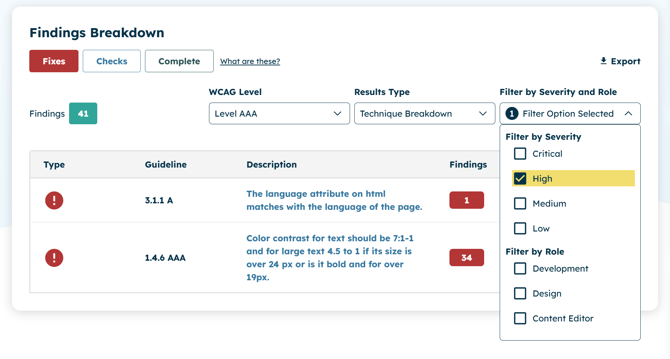
After a domain is scanned, you’ll now see a **“Filter by Severity”** option. Issues are categorised into **Critical, High, Medium,** and **Low** severity levels, as defined by our in-house accessibility experts. This allows users to focus on the highest priority issues that will have the greatest impact on accessibility.
Along with severity filtering, you can also filter issues by the user role responsible for resolving them. Each issue is categorised under **Development, Design,** or **Content Editor** roles, helping cross-functional teams quickly understand which items they can address and prioritise.
---
### **2\. Scheduled Scans - User Email Notifications**
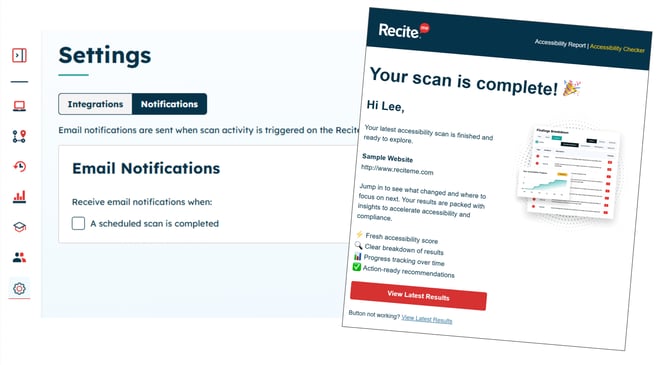
For weekly or monthly scheduled scans, users can opt in to receive an email notification when the scan completes, indicating that new insights and reports are available.
Within **Settings \> Notifications**, users can enable email notifications for scheduled scans. Once a scan is completed, the user receives a branded email confirming which domain was scanned and prompting them to sign in to view the results.
---
### **3\. (BETA) Device Scanning - Mobile & Tablet**
.jpg?width=670&height=463&name=Checker%20v2%20-%20Frame%20111%20(1).jpg)
When enabled at the organisation level, users can scan their site across both desktop resolutions and a **range of mobile and tablet device options**. This ensures that visitors on any device - mobile, tablet, or desktop, receive the same high level of accessibility.
**Note: This feature is currently behind a feature flag and may not be visible by default in your organisation.**
---
### **4\. WCAG Display Levels & CSV Extract Enhancement**
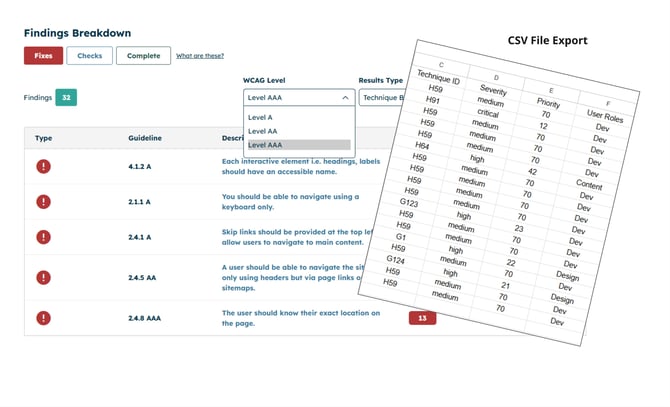
For issues displayed by WCAG levels these were filtered into three separate levels. Now if you **select Level AA** as your conformance level **you will see all Level A and AA issues** within the same list. If you select Level AAA you will see all Level A, AA and AAA issues within the same list.
Previously, you needed to download separate CSV extracts of issues for each WCAG level. Now, when you **select Level AA** as your conformance level, the **CSV extract will include all Level A and Level AA issues** together.
The CSV extract also includes **Severity**, **Priority**, and **User Role**.
- **Severity** and **User Role** match what is shown in the user interface.
- **Priority** is a **numerical rating from 1 to 100** for each issue, where **1 is the highest** priority and **100 is the lowest**.
---
5\. Video knowledgebase - 'How To' Guides
### 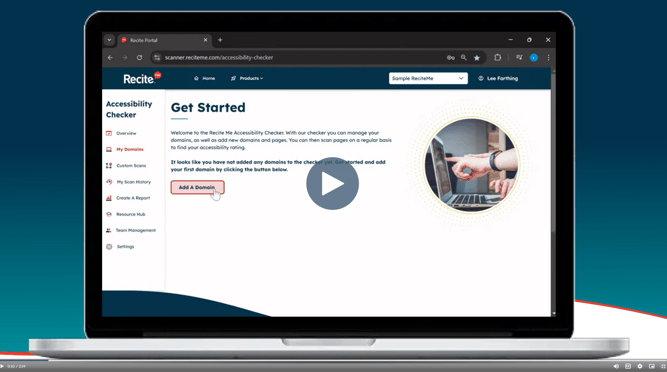
Access concise 1–2 minute video explainers covering key features of the platform - all in one place, so you can quickly learn how to get the most out of Checker.
You can access the video library via the link below:
[https://knowledge.reciteme.com/knowledge/checker-knowledge-base](https://knowledge.reciteme.com/knowledge/checker-knowledge-base?hsLang=en)
- [Toolbar Knowledge Base](https://knowledge.reciteme.com/knowledge/toolbar-knowledge-base?hsLang=en#main-content)
- [2026 Product Updates](https://knowledge.reciteme.com/knowledge/toolbar-knowledge-base?hsLang=en#2026-product-updates)
- [2025 Product Updates](https://knowledge.reciteme.com/knowledge/toolbar-knowledge-base?hsLang=en#2025-product-updates)
- [Toolbar Overview](https://knowledge.reciteme.com/knowledge/toolbar-knowledge-base?hsLang=en#toolbar-overview)
- [Documentation](https://knowledge.reciteme.com/knowledge/toolbar-knowledge-base?hsLang=en#documentation)
- [Implementation & Button Guides](https://knowledge.reciteme.com/knowledge/implementation-button-guides?hsLang=en#main-content)
- [Useful Supporting Documentation](https://knowledge.reciteme.com/knowledge/implementation-button-guides?hsLang=en#useful-supporting-documentation)
- [Checker Knowledge Base](https://knowledge.reciteme.com/knowledge/checker-knowledge-base?hsLang=en#main-content)
- [Accessing Your Account](https://knowledge.reciteme.com/knowledge/checker-knowledge-base?hsLang=en#accessing-your-account)
- [My Domains](https://knowledge.reciteme.com/knowledge/checker-knowledge-base?hsLang=en#my-domains)
- [Understanding Your Results](https://knowledge.reciteme.com/knowledge/checker-knowledge-base?hsLang=en#understanding-your-results)
- [Integration Settings](https://knowledge.reciteme.com/knowledge/checker-knowledge-base?hsLang=en#integration-settings)
- [Create a Report](https://knowledge.reciteme.com/knowledge/checker-knowledge-base?hsLang=en#create-a-report)
- [Chrome Extension](https://knowledge.reciteme.com/knowledge/checker-knowledge-base?hsLang=en#chrome-extension)
- [Crawler - Domain Digital Landscape Detection](https://knowledge.reciteme.com/knowledge/checker-knowledge-base?hsLang=en#crawler-domain-digital-landscape-detection)
- [Product Updates](https://knowledge.reciteme.com/knowledge/checker-knowledge-base?hsLang=en#product-updates)
- [Accessibility Statement Templates](https://knowledge.reciteme.com/knowledge/checker-knowledge-base?hsLang=en#accessibility-statement-templates)
- [Troubleshooting](https://knowledge.reciteme.com/knowledge/checker-knowledge-base?hsLang=en#troubleshooting)
- [PDF Remediator Knowledge Base](https://knowledge.reciteme.com/knowledge/pdf-remediator-knowledge-base?hsLang=en#main-content)
- [PDF Remediator Overview](https://knowledge.reciteme.com/knowledge/pdf-remediator-knowledge-base?hsLang=en#pdf-remediator-overview)
- [Troubleshooting](https://knowledge.reciteme.com/knowledge/pdf-remediator-knowledge-base?hsLang=en#troubleshooting)
- [Security, Continuity and Data Protection](https://knowledge.reciteme.com/knowledge/security-continuity-and-data-protection?hsLang=en#main-content)
- [Certification](https://knowledge.reciteme.com/knowledge/security-continuity-and-data-protection?hsLang=en#certification)
- [Assessments and Security Grades](https://knowledge.reciteme.com/knowledge/security-continuity-and-data-protection?hsLang=en#assessments-and-security-grades)
- [Information Security](https://knowledge.reciteme.com/knowledge/security-continuity-and-data-protection?hsLang=en#information-security)
- [Data Protection](https://knowledge.reciteme.com/knowledge/security-continuity-and-data-protection?hsLang=en#data-protection)
- [Terms Of Service](https://knowledge.reciteme.com/knowledge/terms-of-service?hsLang=en#main-content)
- [Terms](https://knowledge.reciteme.com/knowledge/terms-of-service?hsLang=en#terms)
- [Description of Services](https://knowledge.reciteme.com/knowledge/terms-of-service?hsLang=en#description-of-services)
- [Finance](https://knowledge.reciteme.com/knowledge/finance?hsLang=en)
- [Marketing Resources (UK)](https://knowledge.reciteme.com/knowledge/marketing-resources-uk?hsLang=en#main-content)
- [Getting Started](https://knowledge.reciteme.com/knowledge/marketing-resources-uk?hsLang=en#getting-started)
- [Website Content](https://knowledge.reciteme.com/knowledge/marketing-resources-uk?hsLang=en#website-content)
- [Brand](https://knowledge.reciteme.com/knowledge/marketing-resources-uk?hsLang=en#brand)
- [Internal Comms](https://knowledge.reciteme.com/knowledge/marketing-resources-uk?hsLang=en#internal-comms)
- [External Comms](https://knowledge.reciteme.com/knowledge/marketing-resources-uk?hsLang=en#external-comms)
- [Customer Examples](https://knowledge.reciteme.com/knowledge/marketing-resources-uk?hsLang=en#customer-examples)
- [Advance Your Accessibility Efforts](https://knowledge.reciteme.com/knowledge/marketing-resources-uk?hsLang=en#advance-your-accessibility-efforts)
- [Get Featured on the Recite Me Website](https://knowledge.reciteme.com/knowledge/marketing-resources-uk?hsLang=en#get-featured-on-the-recite-me-website)
- [Marketing Resources (USA)](https://knowledge.reciteme.com/knowledge/marketing-resources-usa?hsLang=en#main-content)
- [Getting Started](https://knowledge.reciteme.com/knowledge/marketing-resources-usa?hsLang=en#getting-started)
- [Website Content](https://knowledge.reciteme.com/knowledge/marketing-resources-usa?hsLang=en#website-content)
- [Recite Me Brand](https://knowledge.reciteme.com/knowledge/marketing-resources-usa?hsLang=en#recite-me-brand)
- [Internal Comms](https://knowledge.reciteme.com/knowledge/marketing-resources-usa?hsLang=en#internal-comms)
- [External Comms](https://knowledge.reciteme.com/knowledge/marketing-resources-usa?hsLang=en#external-comms)
- [Client Examples](https://knowledge.reciteme.com/knowledge/marketing-resources-usa?hsLang=en#client-examples)
- [Advance Your Accessibility Efforts](https://knowledge.reciteme.com/knowledge/marketing-resources-usa?hsLang=en#advance-your-accessibility-efforts)
- [Get Featured on the Recite Me Website](https://knowledge.reciteme.com/knowledge/marketing-resources-usa?hsLang=en#get-featured-on-the-recite-me-website)
- [Marketing Resources (ANZ)](https://knowledge.reciteme.com/knowledge/marketing-resources-anz?hsLang=en#main-content)
- [Website Content](https://knowledge.reciteme.com/knowledge/marketing-resources-anz?hsLang=en#website-content)
- [Brand](https://knowledge.reciteme.com/knowledge/marketing-resources-anz?hsLang=en#brand)
- [Internal Comms](https://knowledge.reciteme.com/knowledge/marketing-resources-anz?hsLang=en#internal-comms)
- [External Comms](https://knowledge.reciteme.com/knowledge/marketing-resources-anz?hsLang=en#external-comms)
- [Get Featured on the Recite Me Website](https://knowledge.reciteme.com/knowledge/marketing-resources-anz?hsLang=en#get-featured-on-the-recite-me-website)
- [EAA](https://knowledge.reciteme.com/knowledge/eaa?hsLang=en)
- [Global Accessibility Awareness Day 2026](https://knowledge.reciteme.com/knowledge/global-accessibility-awareness-day-2026?hsLang=en#main-content)
- [Global Accessibility Awareness Day 2026](https://knowledge.reciteme.com/knowledge/global-accessibility-awareness-day-2026?hsLang=en#global-accessibility-awareness-day-2026)
- [National Inclusion Week 2026](https://knowledge.reciteme.com/knowledge/national-inclusion-week-2026?hsLang=en)
[](http://reciteme.com)
Recite Me Help Centre
Copyright © 2026, Recite Me